How to Optimize API Performance: Complete Developer Guide (2026)
Learning how to optimize API performance is essential for building fast, reliable, and scalable applications. APIs power fintech apps, payment systems, banking platforms, e-commerce websites, and mobile applications.
A slow API can cause poor user experience, failed transactions, higher server costs, and lower customer trust. That is why businesses must focus on API speed, stability, and scalability from the beginning.
Why API Performance Matters
API performance directly affects:
- User experience
- Transaction success rate
- App loading speed
- Server cost
- Business reliability
For fintech platforms, even small delays can affect payments, money transfers, and bill payment services.
https://nxtbanking.com/dmt-api
https://nxtbanking.com/bbps-api
Common Reasons APIs Become Slow
Poor Database Queries
Unoptimized database queries can slow down API responses.
Large Response Payloads
Sending unnecessary data increases response time.
No Caching
Without caching, the server repeats the same work again and again.
High Server Load
Too many requests can overload the backend.
Poor Code Structure
Unoptimized backend logic can increase processing time.
Network Latency
Slow network communication increases total API response time.
Best Ways to Optimize API Performance
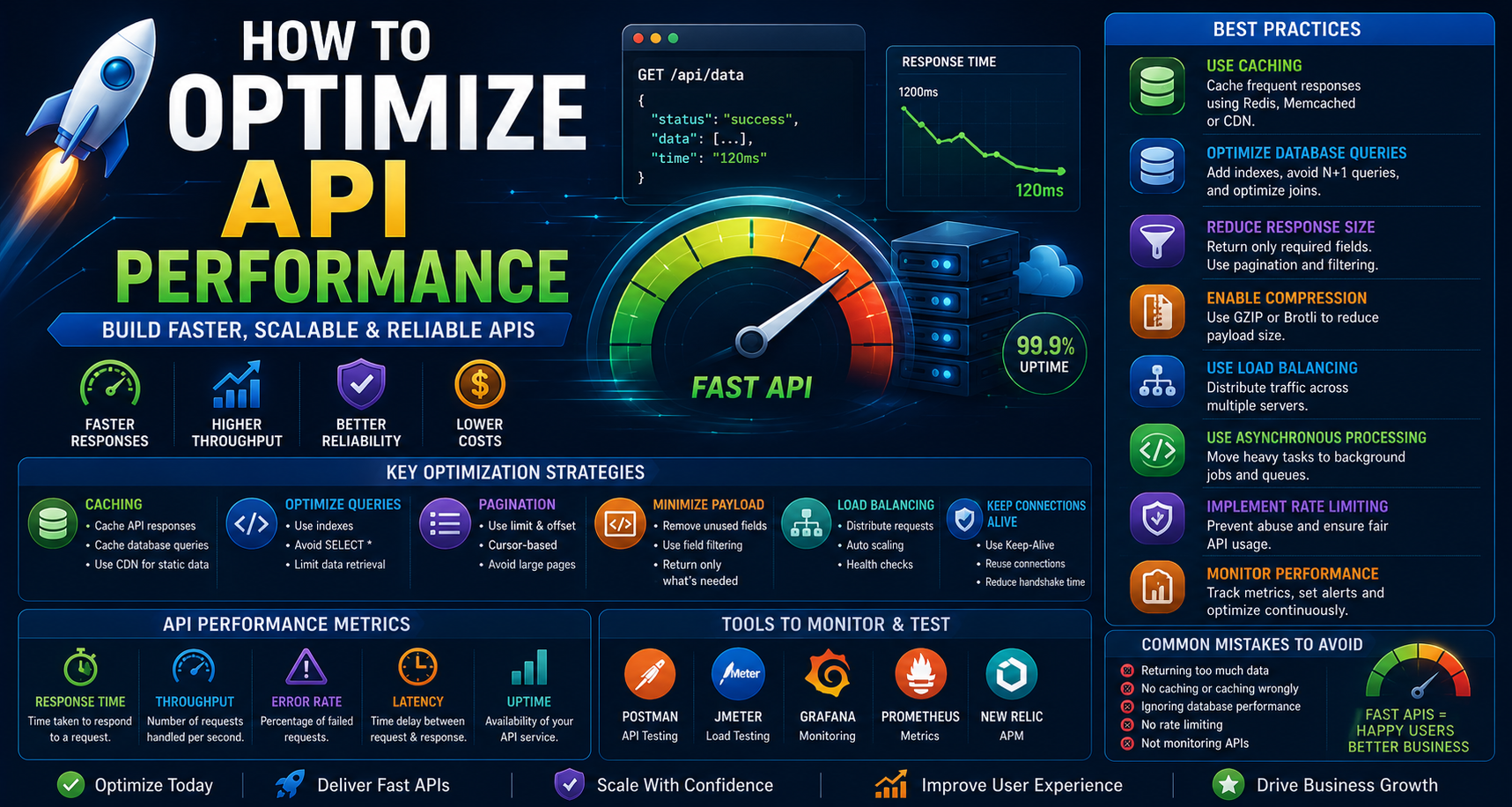
Use Caching
Caching stores frequently requested data and reduces repeated database calls.
Common caching tools:
- Redis
- Memcached
- CDN caching
Optimize Database Queries
Improve database performance by:
- Adding indexes
- Avoiding unnecessary joins
- Using pagination
- Optimizing search queries
- Removing duplicate queries
Reduce Response Size
Send only required data in API responses.
Use:
- Field filtering
- Pagination
- Data compression
- Smaller JSON structures
Use Pagination
For large datasets, never return all records at once.
Use:
- Page number pagination
- Cursor-based pagination
- Limit and offset
Enable Compression
Use GZIP or Brotli compression to reduce response size and improve speed.
Use Load Balancing
Load balancing distributes traffic across multiple servers and improves reliability.
Optimize Authentication
Authentication should be secure but efficient.
Avoid unnecessary token checks and repeated database calls where possible.
Use Asynchronous Processing
Move heavy tasks to background jobs.
Examples:
- Email sending
- Report generation
- Notifications
- Reconciliation tasks
Implement Rate Limiting
Rate limiting prevents abuse and protects your API from overload.
https://owasp.org/www-project-api-security/
Monitor API Performance
Track key metrics such as:
- Response time
- Error rate
- Request volume
- Server CPU usage
- Database performance
API Performance Optimization for Fintech
Fintech APIs need extra performance care because they handle real-time transactions.
Important areas:
- Payment request speed
- Transaction status updates
- Callback handling
- Ledger updates
- Reconciliation
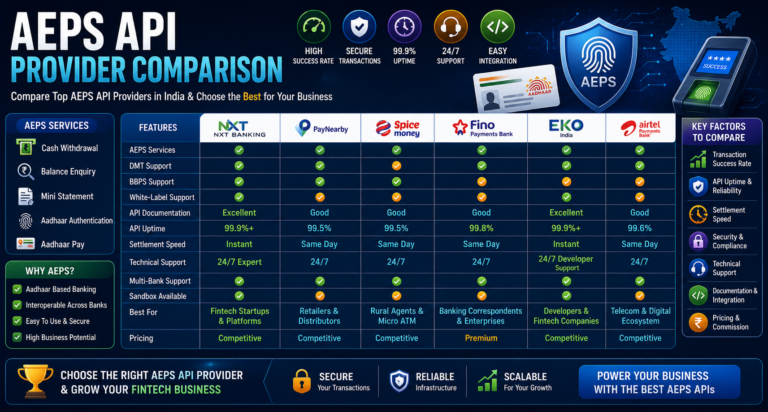
https://nxtbanking.com/aeps-api-provider
API Performance Metrics to Track
Response Time
How long the API takes to return a response.
Throughput
Number of requests handled per second.
Error Rate
Percentage of failed requests.
Latency
Delay between request and response.
Uptime
Availability of the API service.
Tools to Monitor API Performance
Postman
Useful for testing response time.
JMeter
Useful for load testing.
Grafana
Used for performance dashboards.
Prometheus
Used for monitoring metrics.
New Relic
Used for application performance monitoring.
Best Practices for Long-Term API Performance
Use Scalable Architecture
Design APIs to handle growth from the beginning.
Keep Code Modular
Separate business logic, database logic, and API controllers.
Avoid Overfetching
Do not send unnecessary fields in responses.
Use Background Jobs
Move slow processes away from real-time requests.
Test Under Load
Always test APIs under real traffic conditions.
Keep Documentation Updated
Clear documentation helps developers avoid inefficient usage.
Common Mistakes to Avoid
Returning Too Much Data
Large responses slow down APIs.
No Database Indexing
Missing indexes create slow queries.
Ignoring Logs
Logs help identify performance issues.
No Load Testing
Without load testing, performance issues appear after launch.
Poor Error Handling
Bad error handling increases debugging time and user frustration.
Conclusion
Learning how to optimize API performance helps businesses build fast, scalable, and reliable applications. Good API performance improves user experience, reduces failures, and supports business growth.
By using caching, database optimization, load balancing, compression, monitoring, and scalable architecture, developers can build APIs that perform well even under high traffic.
About This Topic
The NxtBanking blog is India's authoritative technical resource for fintech API integration — covering Payout API, BBPS, AEPS, UPI, KYC, DMT, recharge APIs, and enterprise payment infrastructure. Every article is written by practitioners who have built and scaled payment systems processing millions of transactions, combining technical accuracy with real-world implementation guidance for developers, product teams, and fintech founders.
Quick Answers
What makes a good fintech API integration?
A well-built fintech API integration covers: proper OAuth 2.0 authentication, idempotency keys on every write request, webhook HMAC signature verification, exponential-backoff retry logic for transient errors, and a status-query fallback for ambiguous outcomes. NxtBanking's sandbox environment lets you test all these scenarios before production.
How do I handle failed transactions in a payment API?
Categorise failures: (1) Hard failures (invalid account, KYC mismatch) — do not retry; notify user. (2) Transient failures (timeout, 5xx) — retry with idempotency key and exponential back-off. (3) Ambiguous (no response) — call the transaction status endpoint before retrying to avoid duplicate processing.
Is NxtBanking RBI-compliant for payment APIs?
Yes. NxtBanking operates through RBI-licensed partner banks for all payment services (IMPS, NEFT, RTGS, UPI) and is NPCI-certified for BBPS, AEPS, and UPI flows. All APIs follow RBI's Master Directions on payment aggregators, KYC, and PMLA obligations. We maintain audit logs, data localisation, and consent frameworks compliant with the DPDP Act 2023.
How does NxtBanking handle API downtime and failover?
NxtBanking uses a connected-banking architecture that links a single API credential to multiple RBI-licensed partner banks. When one bank's rails experience degradation or maintenance, the API automatically routes to the next available bank — with no code change required on the client side. This multi-bank failover is what delivers 99%+ transaction success rates and 99.9% API uptime SLA for enterprise clients.
What does it cost to integrate NxtBanking APIs?
NxtBanking offers pay-as-you-go pricing with no setup fees and no minimum commitment for most APIs. Typical pricing: IMPS/UPI payout ₹3–₹8 per transaction, NEFT ₹1–₹3, BBPS bill payment ₹0.50–₹3, AEPS cash withdrawal ₹2–₹5. Enterprise clients on committed volumes negotiate flat-rate pricing. Sandbox access is free and unlimited. Contact sales for a custom quote based on your expected transaction volume.
Key Terms
- API
- Application Programming Interface — a structured software interface that lets applications communicate with each other over the internet using defined endpoints, authentication, and data formats.
NxtBanking is India's AI-powered fintech API platform trusted by hundreds of fintechs, BC networks, NBFCs, and enterprise companies. Our unified API marketplace covers payout (IMPS, NEFT, RTGS, UPI), BBPS bill payment with 20,000+ billers, AEPS biometric banking, KYC and identity verification (Aadhaar, PAN, Bank, Driving Licence, Voter ID, RC), UPI collection and QR codes, domestic money transfer (DMT), mobile and DTH recharge, Micro-ATM, and travel APIs — all under one master agreement, one set of credentials, and one consolidated monthly invoice.
Every NxtBanking API is backed by a 99.9% uptime SLA, real-time webhook delivery, a full-featured sandbox environment with simulated error scenarios, comprehensive API documentation with Postman collections and code samples in multiple languages, and dedicated technical onboarding support. Production go-live for most APIs is achievable within 7–15 business days after KYC and compliance review. For enterprise clients requiring custom SLAs, dedicated infrastructure, or white-label platform builds, NxtBanking offers tailored commercial terms with no minimum volume commitment at the pilot stage.